Impasto Paint Pink Peonies Patterns: A Versatile Digital Resource for Creative Projects
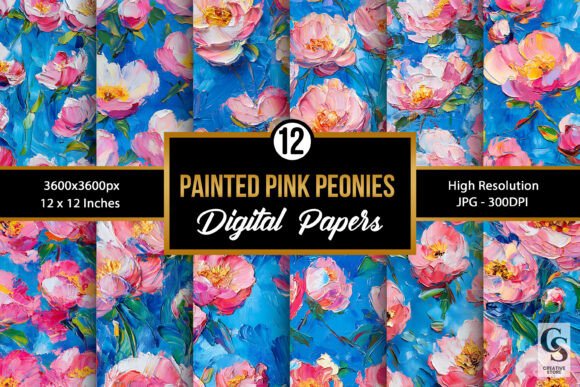
Impasto Paint Pink Peonies Patterns is a digital design collection that brings the rich, textured beauty of impasto painting into your creative toolkit. These patterns feature vibrant pink peonies rendered in a thick, painterly style that mimics traditional oil or acrylic techniques. The result is a visually engaging and tactile aesthetic perfect for both personal and professional projects.
What Is Impasto Painting and How Does It Translate to Digital Design?
Impasto is a painting technique where thick layers of paint are applied to a canvas, creating texture and dimension. When adapted digitally, this style allows designers to replicate the same visual depth and richness without the mess or time required by physical mediums. The Pink Peonies pattern set uses AI-assisted creation, followed by meticulous refinement to ensure each image feels handcrafted and unique.
This approach ensures consistency in quality while also providing the flexibility needed for modern design workflows. Each pattern in the collection has been optimized for clarity and detail at high resolutions, making them ideal for print and digital use alike.
Where Can You Use Impasto Paint Pink Peonies Patterns?
The versatility of these patterns makes them suitable for a wide range of applications. Here are some common use cases:
- Gift Wrapping: Elevate simple wrapping paper with floral accents that add warmth and elegance.
- Greeting Cards: Use as backgrounds or decorative elements for handmade or mass-produced cards.
- Planners and Journals: Incorporate into page layouts or section dividers for a cohesive look.
- Invitations: Add a touch of sophistication to wedding invites, birthday cards, or event announcements.
- Scrapbook Decorations: Bring life to scrapbook pages with floral borders or watercolor-style overlays.
- DIY Projects: Ideal for customizing home décor items like picture frames, coasters, or fabric prints.
- Stationery: Perfect for notecards, letterheads, and other office supplies that need a personal flair.
- Wall Art and Backgrounds: Print large for wall art or use as elegant wallpapers on devices.
- Tumbler Wraps: Customize tumblers, mugs, or drinkware with eye-catching floral designs.
- Notebook Covers: Transform plain notebooks into stylish accessories with printed covers.
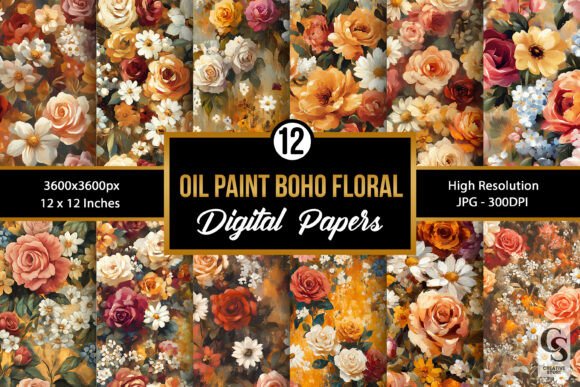
With 12 digital papers included in the zip file, you have a variety of options to choose from depending on the mood or purpose of your project.
Before Starting Your Project: Planning and Preparation
Before integrating Impasto Paint Pink Peonies Patterns into your work, it’s essential to plan how they will be used. Consider the following steps during the preparation phase:
- Determine the Purpose: Identify whether the pattern will serve as a background, accent, or focal point in your design.
- Check File Specifications: All files are in JPG format, high-resolution (300dpi), and sized at 3600 x 3600 pixels or 12” x 12”. This ensures compatibility with most printing services and digital platforms.
- Organize Your Files: Extract the contents of the zip folder and create a dedicated directory for these patterns. Label them clearly if you're using multiple designs in one project.
- Select Complementary Assets: Think about how these patterns will pair with fonts, colors, and other graphic elements to maintain a harmonious design theme.
By taking the time to prepare, you’ll streamline your workflow and avoid potential issues later on.
During the Design Process: Integration and Application
Once you’re ready to begin designing, the next step is to integrate the patterns into your chosen platform. Whether you're using Adobe Photoshop, Illustrator, Canva, or any other design tool, here’s how to make the most of these assets:
- Layering Techniques: Apply the pattern as a background layer and then overlay text or images. Adjust opacity if needed to let the pattern shine through subtly.
- Cropping and Resizing: Because the files are high resolution, you can safely crop or resize without losing quality. Experiment with different compositions to find what works best for your layout.
- Color Matching: Ensure the pattern complements the rest of your design palette. If necessary, adjust the color balance slightly to match your brand or project theme.
- Combining with Other Elements: Use the patterns alongside solid colors, gradients, or other textures to create depth and interest.
These patterns can be particularly useful in branding projects, such as creating cohesive packaging for a product line or designing stationery sets that reflect a company's personality.
After Completion: Quality Control and Long-Term Use
After incorporating the Impasto Paint Pink Peonies Patterns into your design, review the output carefully. Check for alignment, clarity, and overall aesthetics. Since these are digital assets, you can easily tweak the placement or scale before finalizing your project.
For long-term use, consider archiving the original pattern files so you can revisit them for future projects. Keep a record of which patterns were used for specific tasks—this helps maintain consistency across campaigns or product lines. Additionally, storing them in an organized digital asset management system can save time when you need quick access later.
Workflow Examples: Putting the Patterns to Work
Here are a few practical examples of how Impasto Paint Pink Peonies Patterns can enhance your creative process:
Example 1: Custom Greeting Card Design
Start by selecting a pattern that matches the tone of the card—perhaps a softer hue for a sympathy card or a bold design for a birthday. Import the pattern into your design software, place it as the background, and add text or illustrations on top. Use the pattern as a border or watermark for a more subtle effect.
Example 2: Planner Journal Layouts
Incorporate the patterns into weekly spreads or chapter dividers. Print them on premium paper for a luxurious feel or use them digitally for e-journal templates. The floral motifs can help break up dense content and guide the user’s eye naturally through the journal.
Example 3: Event Invitation Suite
Use the pattern as a base for your invitation card. Pair it with a serif font for a classic look or a minimalist sans-serif for something modern. Include additional elements like monograms or dates to personalize the design. These patterns allow you to maintain a consistent theme across all related materials, including RSVP cards and thank-you notes.
Compatibility and Usability Across Platforms
Because the files are in JPG format and provided at high resolution, they are compatible with most design and printing platforms. Whether you're working on desktop publishing software like InDesign or using online tools like Cricut or Silhouette for cutting projects, the patterns should perform well without compromising quality.
If you're preparing for print, confirm that your printer supports 300dpi resolution for optimal results. For digital use, test the pattern on your target device to ensure it displays correctly. Some patterns may require slight adjustments to fit screen ratios or aspect requirements.
Efficiency and Consistency in Creative Projects
One of the biggest advantages of using pre-made digital patterns like Impasto Paint Pink Peonies is the efficiency they bring to the creative process. Instead of spending hours designing a floral motif from scratch, you can focus on refining the message, layout, or functionality of your project. This is especially valuable for entrepreneurs, marketers, and small business owners who need to produce content quickly and consistently.
Consistency is key in branding and design. By using the same pattern across various touchpoints—like social media headers, product packaging, and promotional materials—you reinforce your visual identity and build brand recognition over time.
Adding Creativity Through Personalization
While the patterns are already refined and detailed, they offer ample room for customization. You might want to add a personal logo, change the color scheme, or blend two patterns together for a unique look. The high-resolution nature of the files allows for such modifications without sacrificing quality.
For those interested in learning more about blending digital patterns with other design elements, many online tutorials cover advanced techniques like masking, blending modes, and layer styles. These skills can further expand the usability of the Impasto Paint Pink Peonies Patterns in your workflow.
Quality Control and Storage Tips
To maintain the highest quality of your finished products, always work with the original high-res files until the final stage of production. Avoid compressing the images unless absolutely necessary, and keep a backup copy of the zip file for easy re-access.
Consider naming each pattern based on its visual characteristics or intended use. This makes it easier to locate the right design quickly, especially when working on multiple projects simultaneously. A simple naming convention like “PeonyPattern_01_Background” or “PinkFloral_04_Cover” can go a long way in keeping your digital library organized.
Final Thoughts on Workflow Integration
Impasto Paint Pink Peonies Patterns is more than just a set of pretty images—it’s a strategic resource for anyone involved in design, marketing, education, or creative entrepreneurship. By understanding how to integrate these patterns effectively, you can enhance your productivity, maintain a polished look across projects, and infuse your work with artistic flair.
Whether you're crafting a gift for a loved one, developing a new product line, or simply exploring your own creativity, these patterns offer a reliable and beautiful solution. Their thoughtful creation and attention to detail ensure they stand out in any context, while their adaptability makes them easy to incorporate into your existing processes.
As with any design asset, the key is to experiment and find what works best for your needs. Don’t hesitate to layer, modify, or combine the patterns with other resources to achieve the desired outcome. With a bit of planning and execution, Impasto Paint Pink Peonies Patterns can become a staple in your creative arsenal.